Excel, Word और PowerPoint को PDF में कैसे बदलें बिना डेटा अपलोड किए
Excel sheet, Word document और PowerPoint presentation को PDF में बदलना आम बात है, लेकिन निजी फाइलें किसी वेबसाइट पर अपलोड करना risky हो सकता है।
निजी फाइलें ऑनलाइन अपलोड करने से क्यों बचें?
- Private documents should stay on your device.
- Avoid upload tools for IDs, payments, school or office data.
- Use built-in PDF options first.
Method 1: Word में Save As इस्तेमाल करें
- Open your Word document.
- Click File.
- Click Save As.
- Select PDF.
- Save the file.
Method 2: Excel या PowerPoint में Export इस्तेमाल करें
- Open Excel or PowerPoint.
- Click File.
- Click Export.
- Choose PDF or Create PDF/XPS.
- Save your PDF.
Method 3: Word, Excel और PPT में Print to PDF इस्तेमाल करें
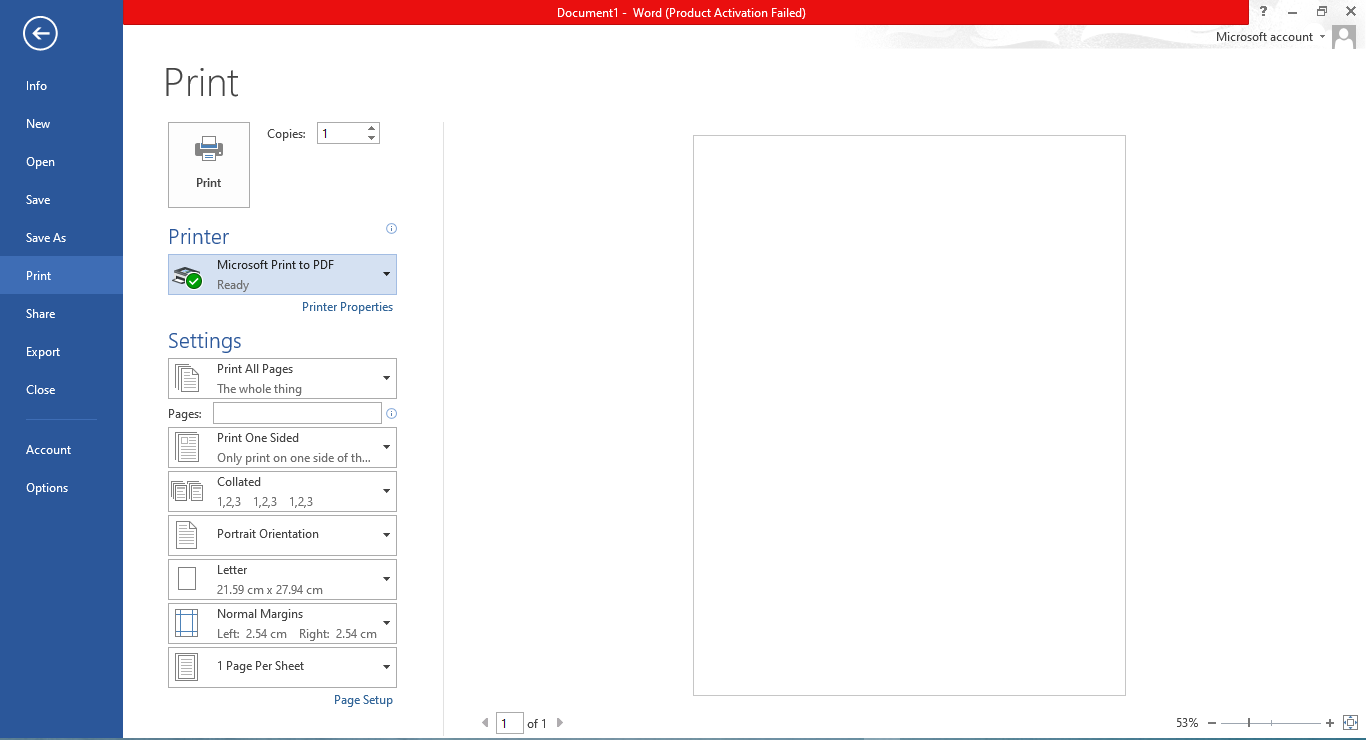
- Open your file.
- Press Ctrl + P or choose File → Print.
- Select Microsoft Print to PDF.
- Click Print.
- Choose folder and save.
यह तरीका ज्यादा सुरक्षित क्यों है
इसमें upload की जरूरत नहीं, data आपके device पर रहता है, और यह Word, Excel और PowerPoint में काम करता है।
FAQ
Is this safe?
Yes, because the PDF is created on your device.
अंतिम सलाह
Private documents के लिए upload-based tools से पहले Save As, Export या Print to PDF इस्तेमाल करें।
अभी JPG को PDF में बदलें